
An AGV drops a pallet at the production buffer. On the fleet screen, the mission is finished. Yet the WMS still shows that pallet in its original rack slot. Which record is wrong? Possibly neither: the robot has reported a trip, but the warehouse has not received the evidence it needs to close the stock movement.
That gap is where many WMS and AGV integration projects become difficult. Getting a vehicle from A to B is only part of the job. The teams also need to agree on what a transport request contains, how pickup and delivery are confirmed, and who handles a pallet that cannot be moved as planned. Below, we work through one example movement, then look at the messages and tests that make it traceable.
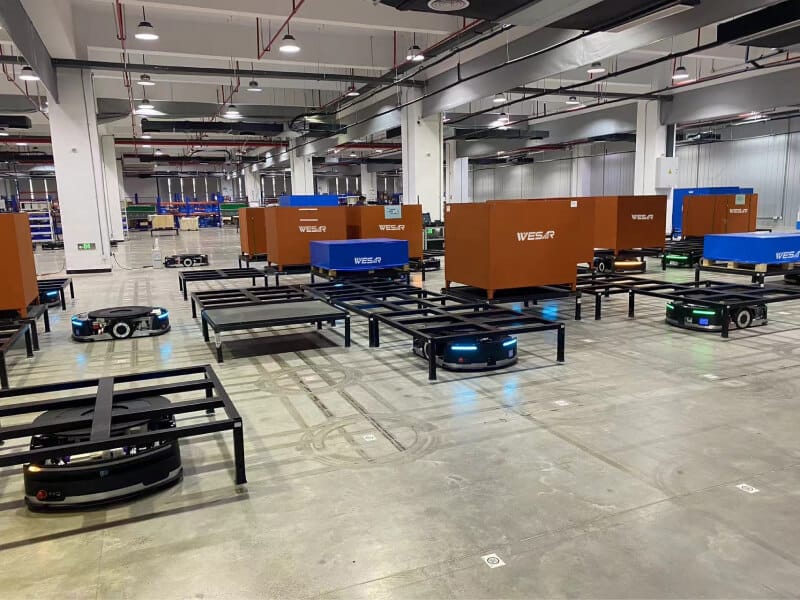
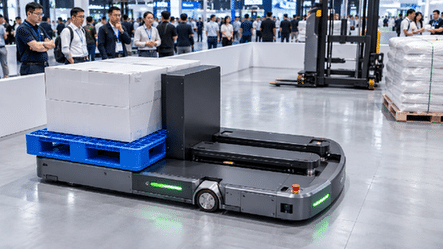
Figure 1. Wesar mobile robots transport material containers in a logistics facility.
Start With One Transport Task and Its Owner
Take a routine replenishment move: pallet PAL-03871 is waiting at STK-A-08 and needs to reach the LINE-B-02 production buffer. The names and numbers here are examples, not actual Wesar software fields. For the warehouse, this is a transfer of one identified handling unit. For the robot fleet, it is a pickup, a journey and a drop-off. Those views overlap, but they are not interchangeable.
The division of work matters. Wesar presents iWMS-1000 as warehouse-management software. Its RCS-2000 product information describes robot task assignment, fleet scheduling and route planning. How either product connects to a customer’s WMS has to be checked against that project’s approved interface documentation; the product pages do not establish a particular API format.
We have already covered the wider roles of WMS, WCS and RCS in a separate article. Here the useful question is narrower: when PAL-03871 moves, what does each system know, and when does it know it?
Specify the Task Contract Before Discussing an API
Integration discussions often jump straight to a REST endpoint or message queue. First, put an actual transport request on the table. If one team reads “destination” as an inventory bin and another reads it as a robot docking coordinate, a perfectly delivered message can still send the task to the wrong place.
The example below is a working checklist for interface design. It is not an extract from Wesar’s RCS-2000 API, and the field names are not presented as supported product parameters.
|
Suggested data item |
Illustrative value |
Integration question it answers |
|---|---|---|
|
Task identity and revision |
MV-000184, revision 1 |
Is this a new job, a retry or a changed request? |
|
Handling unit |
PAL-03871 |
Which physical pallet must be collected and verified? |
|
Origin and destination |
STK-A-08 to LINE-B-02 |
Which inventory locations are involved? |
|
Task type and priority |
Transfer, priority 20 |
Which work rule should the execution layer apply? |
|
Request and event times |
Created time, event time |
Can delayed events be traced and ordered correctly? |
|
Result and exception |
Accepted, or reason code |
Why did the receiving system accept, reject or hold it? |
A task record may also need the permitted load type and its dimensions or weight, depending on how the fleet selects a compatible vehicle. The two teams should settle three ownership questions while reviewing this record: who generates the task ID, who can cancel the move, and what happens when the production buffer changes after the job has been accepted.
Map warehouse slots to actual robot handoff points
STK-A-08 makes sense to an inventory clerk. It may mean little to a mobile robot until someone links it to an approach point, lifting position and orientation. LINE-B-02 could involve a docking location and a separate signal that the buffer is ready to receive the pallet. Keep those relationships in a controlled location map; don’t bury them in assumptions about the route.
Layout changes are a good test of that map. Suppose the buffer is moved or temporarily blocked. The robot should not simply pick another nearby drop-off point because it is free. The WMS has to know where the goods actually ended up, and any alternate destination needs an approved business rule.
Separate Message Receipt From Physical Completion
Ask an integration team what “completed” means and you may get three answers. The message reached the server. The fleet accepted the job. Or the pallet is already on the destination stand. Only the last answer describes the physical delivery, and it still may not mean the inventory transaction has posted.
For design reviews, it helps to write these checkpoints separately:
|
Event boundary |
What has actually been proved |
Appropriate warehouse-system treatment |
|---|---|---|
|
Received |
The message was delivered to the interface |
Do not assume the task is valid or assigned |
|
Accepted |
The execution layer validated and took responsibility for the job |
Show an accepted or queued task, not moved inventory |
|
Pickup confirmed |
The correct handling unit was physically collected |
Update the approved in-transit state if used by this WMS |
|
Drop-off confirmed |
The unit was placed at the target handoff position |
Trigger the agreed inventory-posting check |
|
Business posting confirmed |
The warehouse transaction was committed |
Close the business task and retain traceability |
|
Exception or cancellation |
Normal execution cannot proceed as requested |
Keep stock location controlled until reconciled |
These are business milestones for a sample integration, not a list of status codes published by Wesar. A real controller may combine some events or use different labels. During commissioning, each actual message needs to be mapped to the evidence it provides.
Define what counts as pickup and delivery proof
Imagine the robot has arrived at the pickup waypoint but the pallet is missing. Marking the task as “picked up” at that point would create a false stock movement. Pickup confirmation needs to come from a relevant source: for example, a load sensor, an equipment handshake, a barcode read or an approved manual check. Delivery has its own evidence requirement. A reached coordinate alone does not tell the WMS whether the load was released successfully.
One important decision belongs to the warehouse team: when does inventory change location? Some operations record an in-transit state at pickup; others hold the original location until verified drop-off. Either model can be documented and tested. The robot layer should report what happened physically, while the WMS applies the agreed stock rule.
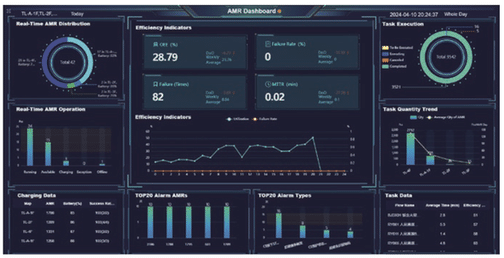
Figure 2. Fleet monitoring dashboard from Wesar’s RCS-2000 product page.
Make Retries Safe Before the Network Fails
Consider a timeout after the WMS submits MV-000184. The request may have reached the robot controller even though its acknowledgment never reached the WMS. If the warehouse sends it again, should a second AGV arrive at STK-A-08? Clearly not, but the interface needs a rule that prevents it.
That rule is usually built around a stable task identifier. A retry with the same ID and unchanged content should point back to the existing movement. If the destination has changed, treating the new request as an ordinary retry is dangerous. The receiving system should flag the conflicting revision or process it through an agreed amendment procedure.
The return path deserves the same care. A delayed “accepted” event cannot take a task back from “picked up” to “queued.” Nor should a repeated delivery event post the inventory transfer twice. Message IDs, task versions, acknowledgments and a recoverable history give engineers something to reconcile when the network is unreliable. Timestamps are useful clues, but clocks on separate systems are not a substitute for agreed event-order rules.
Handle cancellation according to the physical stage
Canceling an unstarted job may be straightforward. Canceling a task after the AGV has lifted the pallet is a different operation: the goods are no longer at their source, whatever the software status says. The project needs a recovery choice such as a safe holding point, a return to origin or an authorized new destination. Until the physical location has been confirmed, both the fleet view and the warehouse record should show that recovery is pending.
Design Exception Messages That Tell Operators What to Do
An operator seeing “task failed” still has to find the pallet, identify the cause and decide whether it is safe to retry. A useful exception tells them which task and handling unit are involved, the last verified physical event, and who is expected to act next. Three common cases illustrate the difference.
Missing or mismatched pallet at pickup
Perhaps the slot is empty, a scan returns the wrong pallet ID, or the forks cannot take the load. In each case, the exception should retain the task and carrier identity without claiming a successful pickup. Warehouse staff can then check the unit and the source location. A robot’s arrival at the pickup point is not a reason to post the stock as in transit.
Destination occupied after pickup
Now assume the pallet is on the AGV but LINE-B-02 becomes occupied. The fleet may wait, return or proceed to another approved handoff. Those choices are operationally different for inventory: the pallet could be on the robot, back in its original area or at a new buffer. The warehouse system needs the chosen location and its confirmation, rather than an unexplained “completed” message from route planning.
Robot offline or status update delayed
A silent vehicle is not necessarily an unsuccessful delivery. Before dispatching a replacement task, check the latest confirmed pickup or drop-off and, where available, whether the robot is still carrying the load. If the physical findings and software records conflict, an operator-led reconciliation is safer than automatic closure or an immediate second pickup.
Commission With a Test Matrix, Not One Successful Trip
One clean journey proves little about the interface. The more revealing trial is the one in which a message arrives late, the destination is occupied or the pallet identifier does not match. Run the following checks with traceable test loads, and inspect both systems afterward:
Normal move: compare task creation, acknowledgment, pickup evidence, delivery evidence and final WMS posting.
Invalid destination: confirm that the WMS sees the rejection and no vehicle is sent.
Repeated request: resend the same task ID after a simulated timeout and check that only one movement occurs.
Out-of-order feedback: deliver an older event late; the business task must not move backward.
Missing or incorrect pallet: identify who resolves the exception and confirm there was no false inventory posting.
Cancellation with load onboard: record where the pallet is held, returned or redirected under the approved procedure.
Occupied buffer or offline vehicle: follow the recovery through to a verified final stock location.
Keep the evidence together for each test. At a minimum, the task ID, handling-unit ID, active location mapping, interface version, message times, fleet status and WMS status should be traceable to the pallet’s observed final position. “Robot trip passed” is not a complete acceptance result if the inventory remains in the wrong bin.
Wesar’s software platform portfolio shows the relevant software categories. For an actual installation, the acceptance cases still have to match the interface and warehouse rules approved for that project.
결론
At handover, ask a simple question: can someone follow one pallet from the WMS request through physical pickup and drop-off to the final inventory entry? If the answer requires checking unrelated logs and guessing what “complete” meant, the integration is not finished. Clear task ownership, location mapping, event evidence and tested recovery rules make that record usable for operators long after the demonstration run.
자주 묻는 질문
1. Does WMS have to send motor-level driving commands to the AGV?
Usually not in a fleet-managed setup. The WMS requests the warehouse move; a robot control layer handles dispatch and motion. The exact split depends on the approved site architecture.
2. Who should create the transport task ID?
Either side may generate it, provided one logical move keeps a stable identity across retries, changes and status reports. Set that ownership in the interface agreement.
3. Is an ‘accepted’ response enough to move the inventory in WMS?
No. It shows that the receiving system has taken the task, not that a pallet has moved. The warehouse’s posting rule should rely on the agreed physical pickup or delivery evidence.
4. Can a canceled task be closed immediately after the robot has picked up a pallet?
Only after the load’s real location is known and recorded. A cancellation message does not tell the warehouse whether the pallet was held, returned or redirected.
5. What if a task message is sent twice after a timeout?
Both submissions should resolve to the same logical job, not two collections. Also test duplicate completion feedback; it must not trigger two inventory postings.
6. How do WMS rack locations map to AGV navigation points?
Maintain a reviewed mapping between warehouse slots and robot approach, pickup and drop-off positions. Include orientation and station handshakes if the equipment requires them, and retest after layout changes.
7. What is the most important go-live test besides a normal transport?
Try a pickup that succeeds followed by a blocked destination. It quickly shows whether both systems can identify the pallet, assign recovery responsibility and agree on its final inventory location.






 Korean
 English
 Russian
 Chinese
 Japanese
 Italian
 Spanish
 Arabic
 French
 German